
As businesses grow, they often introduce new applications to manage sales, finance, operations, and customer relationships. Each application serves a purpose, but connecting the information and processes between them can become increasingly difficult.
Employees may find themselves entering the same information into multiple systems, manually transferring data, or relying on workarounds to complete everyday tasks. Over time, these disconnected processes can affect efficiency and the reliability of business information.
Zoho One provides a suite of business applications that can work together through native integrations, Zoho Flow, and custom development. Understanding when to use each approach helps businesses connect their applications more effectively while avoiding unnecessary complexity.
Native Integrations, Zoho Flow, or Custom Development?
Zoho One offers several ways to connect applications and extend their functionality. Choosing between them starts with understanding the process, the information involved, and the actions that need to follow.
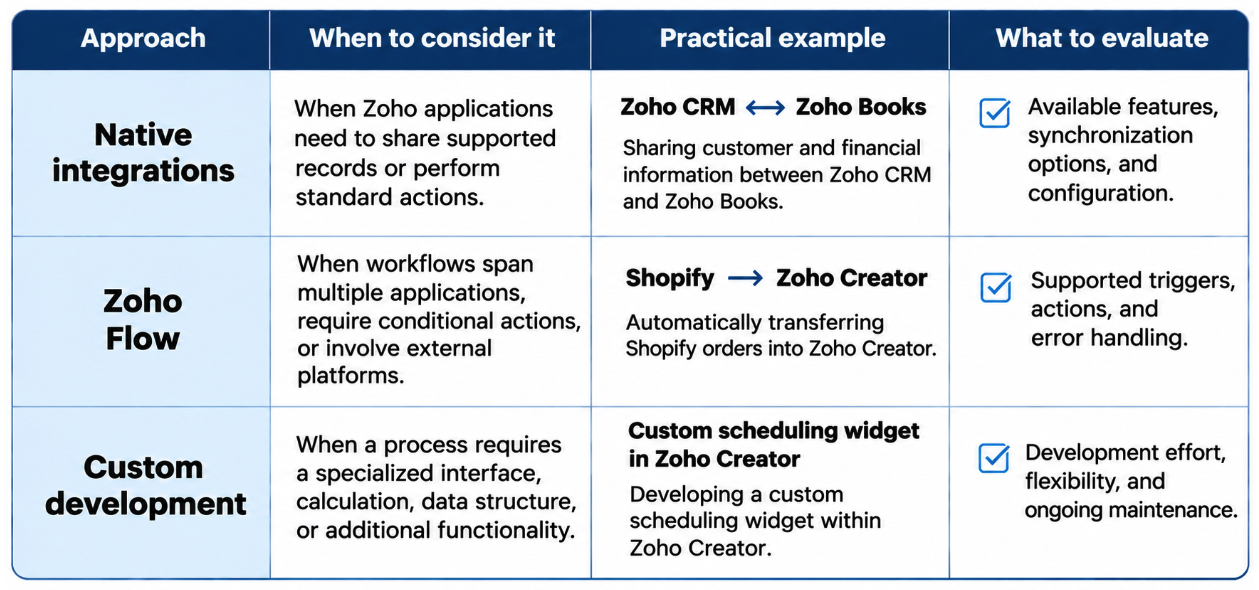
These approaches aren’t mutually exclusive. Native Zoho applications already support a range of automation capabilities, while Zoho Flow can coordinate more involved processes across systems. Custom functions, APIs, and Zoho Creator applications can extend functionality where additional flexibility is needed.
The decision begins with a practical assessment:
- Can the existing application handle the process? Review its built-in features, configuration options, and supported integrations before introducing additional tools.
- Does the process need to coordinate actions across systems? Identify the triggers, conditions, and information that must move between applications. Zoho Flow may provide the necessary automation.
- Does the process require functionality specific to the business? A specialized interface, calculation, or data structure may justify targeted development.
Evaluating these options helps businesses make use of existing capabilities while introducing customization where it provides a clear benefit. The value of combining these approaches becomes clearer when applied to real business processes.
Adapting Zoho One to Specialized Business Needs
Piscine Hippocampe, a Canadian pool and spa manufacturer and retailer, needed a system capable of managing its specialized operations, from inventory and sales to technician scheduling and service calls.
Using Zoho One, BSP developed a custom ERP with Zoho Creator at its core, supported by Zoho CRM for customer and vendor records, Zoho Books for accounting, and Zoho Forms and Flow for data collection and automation.
Different processes called for different approaches. BSP used Zoho Flow to transfer Shopify orders into Zoho Creator automatically and combined Zoho Forms and Flow to automate service-call processes.
For technician scheduling and service-call tracking, Zoho Creator’s native calendar did not fully accommodate the client’s requirements. BSP developed a custom calendar widget in Zoho Creator to add the functionality needed to manage these activities.
By combining existing integration capabilities with targeted customization, BSP helped streamline operations and save the company an estimated 5 to 10 hours per week.
Read the full Piscine Hippocampe case study.
Keeping Your Technology Stack Reliable as Your Business Evolves
Once applications are connected, the next consideration is how information moves between them and what happens when a process doesn’t run as expected.
Consider an automated invoice that cannot be generated because the customer’s billing information is incomplete. A well-designed workflow should identify the missing information, notify the appropriate team, and prevent duplicate invoices when the process resumes.
Three areas help keep integrations reliable as business processes evolve:
- Data consistency: Establish which application maintains the authoritative information and how updates are shared across systems.
- Error handling: Define how failed actions are identified, corrected, and monitored so they don’t interrupt downstream processes.
- Maintainability: Document integrations and dependencies so workflows can be adjusted when processes, departments, or applications change.
These considerations belong in the initial design, not only when a problem occurs.
At BSP, we help businesses evaluate their processes and choose the right combination of native integrations, automation, and custom development to support their operations.
Is your Zoho One environment working the way your business needs it to? Connect with BSP to explore opportunities to improve your existing setup.


